
Write the test question
Write one question before making variations. For example, does casual clothing or a jacket work better for this product demonstration? Define the appearance change, and keep the script, offer and product demonstration consistent. Compare campaign results to answer the question.
Create separate character directions
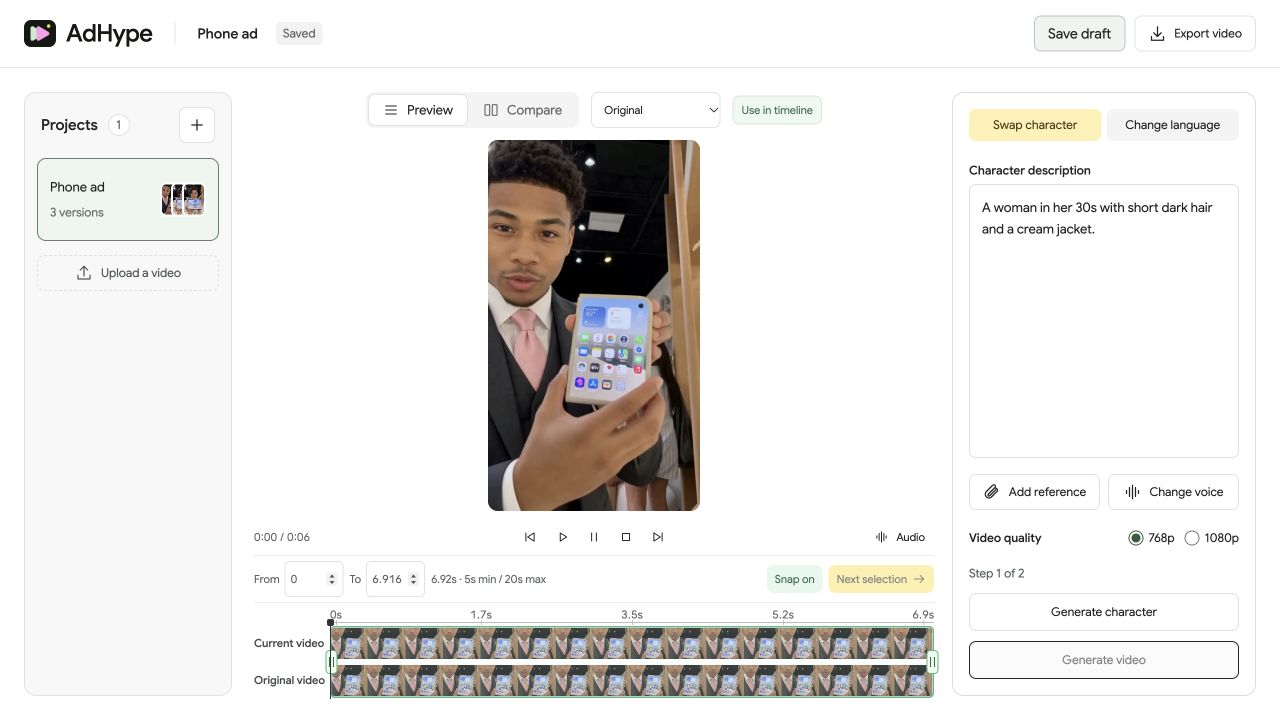
Use a distinct description for each planned presenter. AdHype keeps the description with its version, so you can revisit a result and see what produced it. Review each still before generating its video.
Keep the review standard constant
Compare every result with the original using the same quality checklist. Reject visible defects before publishing. A warped product or poor mouth movement introduces another variable and can undermine the creative test.
Evaluate in your ad platform
Export the versions you want to test in your ad platform. Keep the audience, offer and delivery conditions comparable. Decide whether you will judge results by purchases, leads or another campaign goal before launch.
Before you export
- Each version answers the same test question.
- The offer and product demonstration stay consistent.
- Output defects are not mistaken for presenter preference.
Will a new presenter improve ad performance?
A new presenter gives you another version to test. Whether it improves clicks or sales depends on the ad and audience, so compare performance in a controlled campaign test.
Read the walkthrough notes
Start a presenter test with one question. Decide what appearance you want to compare while keeping the offer and product moment consistent.
Write a separate character description for each direction. AdHype keeps that description with its version, so you can return to it later.
Review each still, then compare the finished clips against the same original. Remove versions with visual defects before testing.
Export the versions you want to test in your ad platform. Keep the audience and offer comparable so you can assess the presenter change.