
Define the variable
Write down what you are testing before you choose a tool. If the only planned change is facial identity, treat hair, wardrobe and body appearance as things to preserve. If the creative calls for a different presenter and styling, a character swap is a closer description of the job.
Keep the product in view
A convincing face is not enough for a usable ad. Compare the product shape, packaging, hands and gesture with the source. If the actor holds an item near the face, check both together. Changes to a label can matter more than a small background difference.
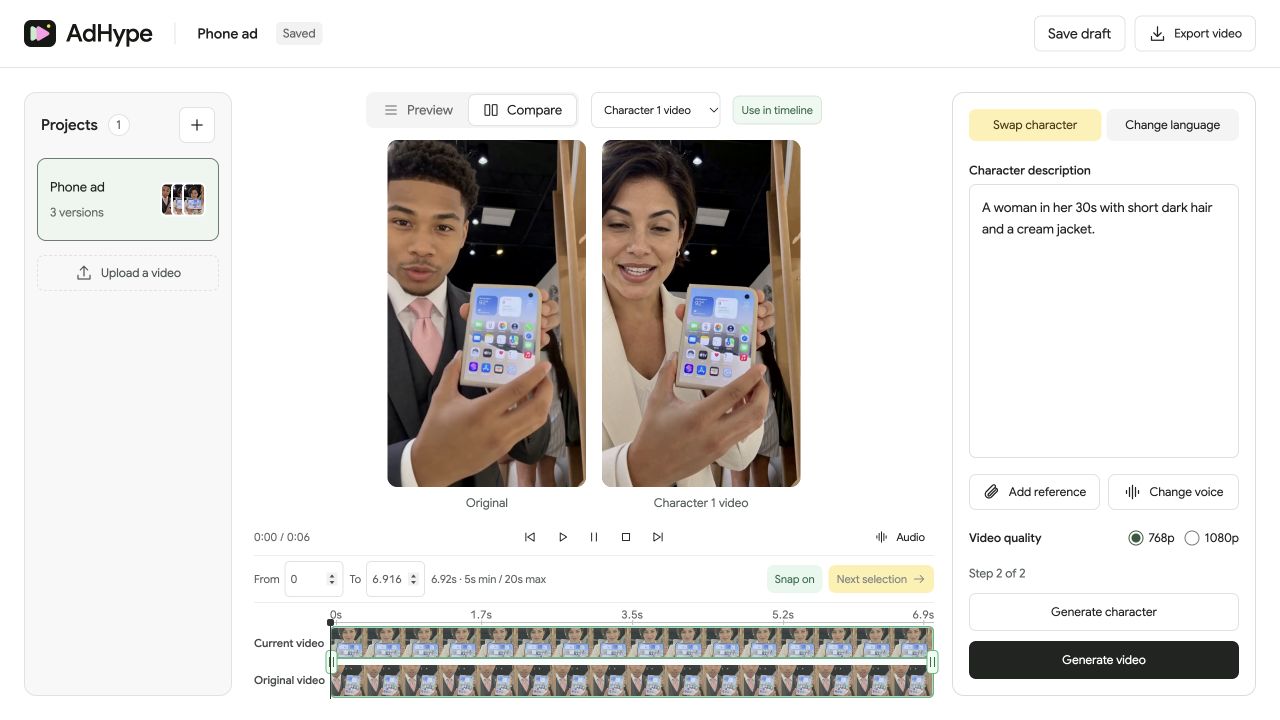
Use the still as a checkpoint
In AdHype, describe the character and generate a still. You can add a reference image to guide the appearance. Check the face, hair, clothing and product together before making the video.
Judge the moving result
Watch expressions, mouth movement and profile turns. A good single frame can still become unstable in motion. Use the synchronized comparison to see whether the replacement works throughout the selected section.
Before you export
- The change matches the creative brief.
- The product remains recognizable.
- The person whose likeness you use has granted the necessary permission.
Is AdHype a face-only editor?
AdHype creates character replacements that can change hair, clothing and other details as well as the face. Review the full frame when your brief calls for a face-only change.
Read the walkthrough notes
A face swap and a character swap solve different creative problems. Begin with what you want to change in your ad.
A face swap focuses on facial identity. A character swap can also change the presenter’s hair, clothing and overall appearance.
Use the character image to review the whole frame. The face matters, but so do the hands, the product and the surrounding scene.
Then compare the videos in motion. Look at expressions and head turns. Choose the version that fits your brief, and use likenesses only with permission.