
Choose the finished source
Select your original video or a completed video result. Choose a video with clear speech and a visible presenter. Check that its price, product availability and offer apply in the market you want to reach.
Open Change language
Choose the target language and, where available, its regional option. Source-language detection can remain automatic when the speech is clear. Add brand and product keyterms to guide the translation of names that should be preserved.
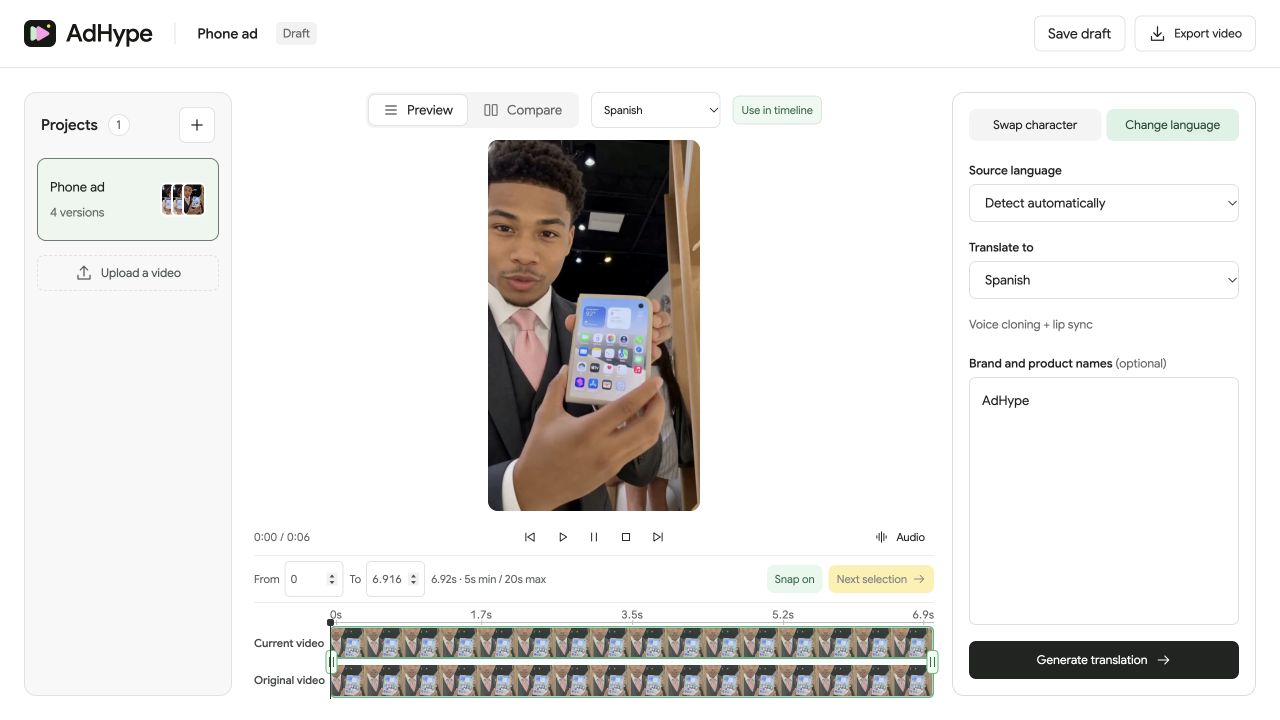
Generate a separate language version
Translation creates a new saved version, leaving the source available. Its language label helps you identify it later. Review translated speech and lip movement together; check the wording as well as the sound of the voice.
Ask for a local review
Have a fluent reviewer check the offer, tone, pronunciation and call to action. Review any text already visible in the video, including prices, packaging and captions. Dubbing changes the speech, so update that text separately when needed.
Before you export
- The target language and region match the audience.
- Product names and offer details remain accurate.
- On-screen text has been reviewed separately.
- A fluent reviewer has listened to the full result.
Does dubbing translate text visible in the video?
No. This workflow translates spoken audio and aligns lip movement. Update embedded text, captions, prices and graphics separately when needed.
Read the walkthrough notes
To localize an ad, choose a finished video with clear speech. Check the offer first, including prices and any text already visible on screen.
Open Change language. Choose your target language and regional option. Add brand or product names as keyterms when they need special care.
Generate the translation as a new version. The original stays available, and the language label helps you find the translated result.
Review speech and lip movement together. Ask a fluent speaker to check meaning, tone and pronunciation. Dubbing alone does not localize every detail in the ad.