
Check the message
Have a fluent speaker compare the translation with the original meaning. Prioritize prices, numbers, offer conditions, product benefits and the call to action. A sentence can sound natural while making a different promise.
Listen to the delivery
Use headphones for one pass. Check names, pauses, emphasis and whether background sound distracts from the speech. Listen through the entire clip rather than judging from the first sentence.
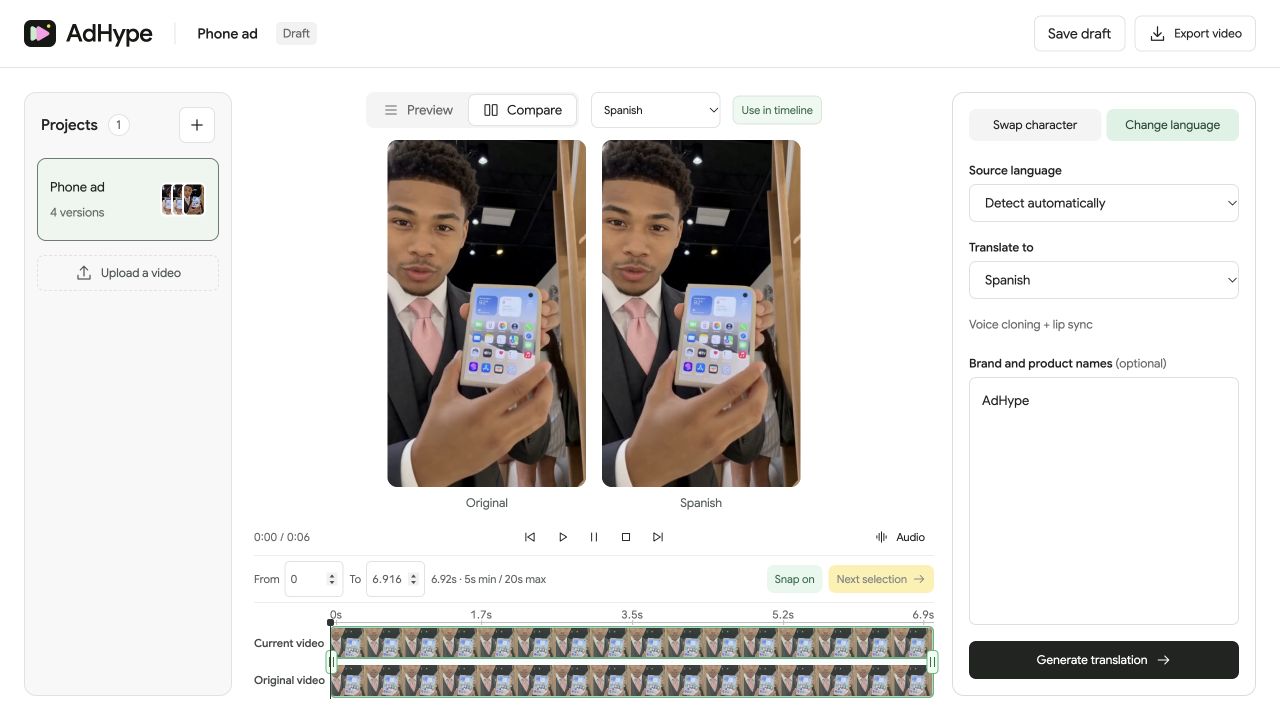
Inspect lip sync and motion
Use Compare and the shared timeline. Look for words that begin or end after the mouth movement, especially at cuts and pauses. Scrub to a moment where speech and mouth movement appear out of sync, then replay it at normal speed to judge whether it is noticeable.
Review local details
Check prices, currency, website addresses, packaging and text already embedded in the picture. Confirm that the final exported file is the intended language version. Keep the source and approved version clearly named in your campaign workflow.
Before you export
- The translation preserves the offer and claim.
- Product names are pronounced correctly.
- Lip movement and speech timing are acceptable.
- The final exported language is correct.
Who should approve the translated wording?
Use a fluent reviewer who understands the intended audience and the offer. Automated generation does not replace that approval step.
Read the walkthrough notes
A dubbed ad needs more than a quick listen. Start with meaning. Ask a fluent reviewer to check the offer, numbers and call to action.
Listen to the entire track with headphones. Check product names, pauses and emphasis.
Use Compare to inspect speech timing and mouth movement. Scrub to a questionable moment, then replay it at normal speed.
Finally, review the local details still visible in the picture. Confirm the language of the exported file before sending the ad to your campaign team.