
Check the still at full size
Start with the face and then move outward. Inspect hair edges, clothing, hands and any object the presenter is holding. Compare the product outline and visible text with the source. Fix obvious image issues before generating motion.
Watch faces in motion
Play the result at normal speed before scrutinizing individual frames. Watch blinks, smiles, profile turns and the mouth during speech. Then scrub to any moment that looked unstable. A still cannot tell you whether the identity will stay consistent.
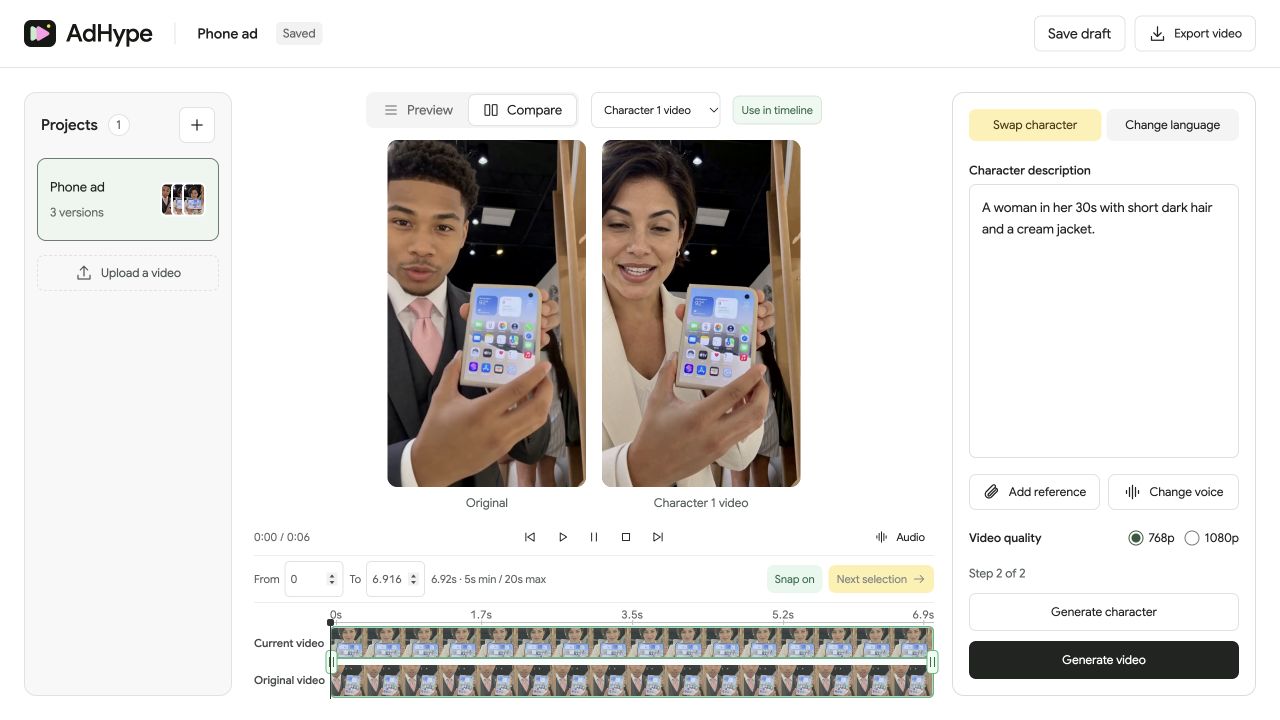
Check product and background
Look at the phone, packaging or demonstration area while the presenter moves. Hands can obscure important product detail. Check whether edges wobble or objects change shape. Review text that must be accurate rather than relying on the overall impression.
Review the final viewing format
Play the full exported version in the aspect ratio and size you plan to publish. Check section joins and listen with headphones. If the video includes speech, assess whether the voice still suits the new presenter.
Before you export
- The face stays consistent during turns.
- Hands and product details look accurate throughout the section.
- Section joins play without abrupt visual or audio changes.
- Every claim and visible brand detail is still correct.
Should I review frame by frame?
Use both normal playback and targeted scrubbing. Normal speed reveals distracting motion; scrubbing helps locate the exact frame or boundary that needs another pass.
Read the walkthrough notes
Review a character swap in two passes. First, inspect the still. Check the face, hair, hands and any product in the shot.
Then watch the video at normal speed. Pay attention to blinks, smiles and head turns. Scrub back to moments that look unstable.
Compare the product and background with the original. Check labels and edges, especially when a hand moves across the frame.
Watch the complete export and listen to its audio. Check each section join before adding the video to your campaign.